
Electronic invitations and attendance confirmation
Choose who to invite, prepare your message, send it and review the replies. Each reply is linked to the guest and updates the event.
Invitations with the correct form of address
Email templates are prepared for each language using a visual editor and support custom variables: forms of address, positions, accompanying guests or QR codes. They can include attachments and a calendar file (.ics).
- Language-specific templates with a visual editor
- Custom variables in every message
- Attachments and a calendar file (.ics)
Scheduled bulk emails
Emails can be scheduled and sent to entire groups. Stela sends email through SendGrid, SMTP or Microsoft 365/Exchange, depending on the organisation’s account.
A response portal for every guest
Each guest responds through their own web portal, using a personal link and code verification. They can accept, decline, send their apologies or nominate someone to attend on their behalf, choose between attending in person or online, and select which events in the programme to attend.
- Accept, decline, send apologies or nominate a representative
- In-person or online attendance
- Select events from the programme
Accompanying guests, forms and unsubscribing
Guests can add accompanying guests, complete configurable registration forms and unsubscribe from communications. The organiser sets a response deadline. The portal is available in several languages, as are the communications and forms.
Track every email and every response
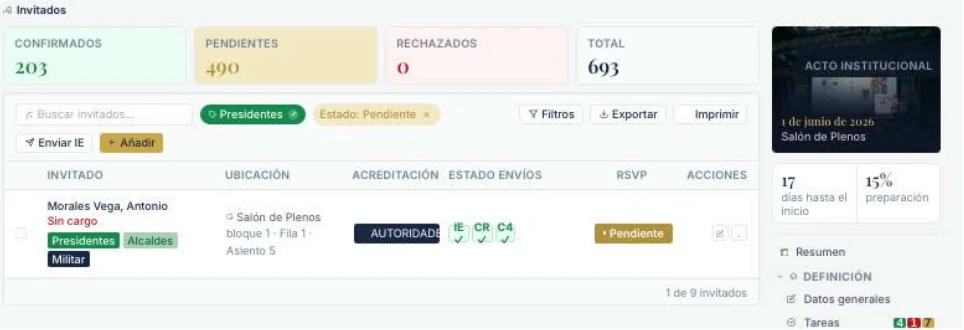
For each guest, the organiser can see the status of each email (sent, delivered or failed) and their response, with its date. Emails can be resent and statuses changed in bulk, and Stela sends automatic emails when guests accept, decline or nominate a representative.
- 1Recipients
- 2Message
- 3Sending
- 4Tracking
Discover Stela in a demonstration
We will show you how Stela can help you organise more effective, secure and memorable events.
Request a demo