
Managing precedence and institutional guests
People, positions and institutions in one place, with a hierarchical structure, precedence and forms of address always up to date. Every event starts with reliable information, not a spreadsheet.
A single institutional database
Officials’ contact details are no longer scattered across spreadsheets. Each person has a record containing their photograph, institution, addresses and contact details, preferred language and notes, and can hold several positions at once.
- Multiple positions per person, with start and end dates
- A specific form of address and rank in the order of precedence for each position
- Institutions with organisational charts and positions grouped hierarchically
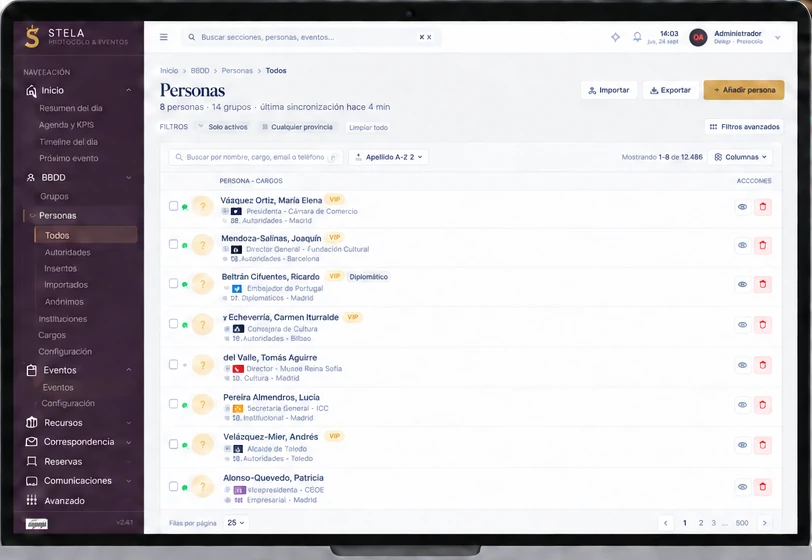
Precedence and automatic guest ranking
Each position has a rank in the order of precedence defined by the organisation, either manually or from Excel. Stela uses it to rank guests and seat them on the floor plan. If an event requires it, an alternative order can be enabled for that event or for the whole organisation.
Forms of address and courtesy expressions
Stela maintains a catalogue of forms of address with long and short, masculine and feminine versions, which can be translated into each language. In invitations and documents, it automatically selects the correct form according to each person’s gender and language, just as it does for their position title.
Importing from Excel and CSV
Import people with their positions and groups from Excel (.xls and .xlsx) or CSV, and photographs from a zip file. Stela validates every row and field, detects duplicates, including by identity document, and lets you merge records. When importing guests, AI-assisted analysis flags errors and potential duplicates.
Groups, tags and history
Groups are hierarchical and can be reused across events: you can invite an entire group or select guests by position. Tags categorise any record, and each person’s record retains a history of the events they have attended and the emails they have received.
Accompanying guests
Accompanying guests are configured in the invitation for each event: whether they are allowed, the maximum number and their designated zone.
Access control and auditing
Granular roles and permissions, event-specific profiles and private records protect officials’ information. Each record stores who created, modified or deleted it and when, while the audit log records changes field by field.
- 1Create and import records
- 2Groups and precedence
- 3Forms of address and salutations
Discover Stela in a demonstration
We will show you how Stela can help you organise more effective, secure and memorable events.
Request a demo